Chrome DevTools Vulnerability: Understanding Session Hijacking Risks
A new vulnerability in Chrome DevTools poses significant risks for users, enabling authenticated session hijacking. This article explores the implications of this flaw and how businesses can safeguard themselves.
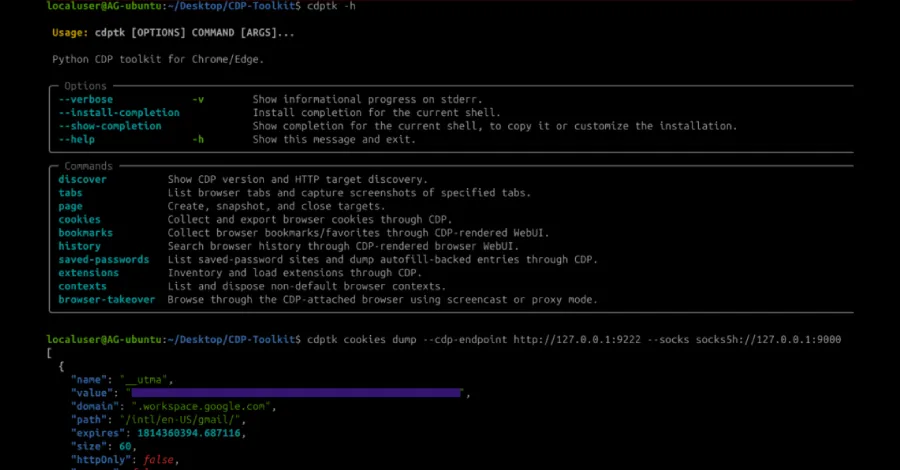
In today's digital landscape, web browsers are not just gateways to information; they serve as critical interfaces for both personal and business transactions. The recent discovery of a vulnerability in Chrome DevTools has raised alarms among cybersecurity professionals, highlighting the potential for authenticated session hijacking. This flaw, which could allow malicious actors to exploit cross-domain privilege escalation, poses a substantial threat to users and organizations alike. In this article, we will delve deeply into the mechanics of this vulnerability, its implications, and the steps businesses can take to fortify their defenses.
Understanding the Chrome DevTools Vulnerability
Chrome DevTools is a powerful suite of web development tools built directly into the Google Chrome browser. It allows developers to inspect HTML and CSS, debug JavaScript, and analyze performance metrics. However, the very features that make DevTools invaluable in development can also expose users to significant security risks when exploited maliciously.
The Mechanics of Session Hijacking
Session hijacking occurs when an attacker takes control of a user's session after successfully impersonating them. This can involve stealing session cookies or tokens that authenticate a user on a website. The recent vulnerability in Chrome DevTools enables attackers to manipulate cross-domain requests and potentially hijack sessions without needing to compromise the user's credentials directly.
How the Vulnerability Works
At its core, the vulnerability allows for unauthorized access to authenticated sessions by exploiting the way browsers manage cross-origin requests. When a user interacts with a website through Chrome, their browser maintains session data that can include sensitive information like login credentials. If an attacker can manipulate these requests, they can redirect the browser to a malicious site that replicates the legitimate one, tricking the user into providing their session data.

Real-World Implications of the Vulnerability
The potential consequences of this vulnerability are far-reaching, especially for businesses that rely on web applications to handle sensitive customer data. Here are a few real-world scenarios where this vulnerability could be exploited:
- Data Breaches: Attackers can gain access to sensitive user information, leading to data breaches that can damage a company's reputation and bottom line.
- Financial Fraud: With access to user sessions, attackers could initiate unauthorized transactions or modify account settings.
- Identity Theft: Users' personal information can be exploited for identity theft, resulting in long-term damage to individuals and businesses alike.
Mitigating the Risk of Session Hijacking
Given the severity of this vulnerability, it is crucial for businesses to take proactive measures to protect themselves and their users. Here are several strategies to mitigate the risks associated with session hijacking:
1. Update and Patch Regularly
Ensuring that all software, including web browsers and applications, is up to date with the latest security patches can significantly reduce the risk of exploitation. Organizations should implement a routine for regular updates to all software components.
2. Implement Content Security Policies (CSP)
Content Security Policies can help restrict the types of content that can be loaded on a webpage, thereby minimizing the risk of malicious scripts being executed. By allowing only trusted sources, organizations can create a layer of defense against cross-origin attacks.
3. Educate Employees and Users
Training employees and users about the risks of session hijacking and how to recognize phishing attempts is essential. Awareness campaigns can empower users to take precautions when interacting with web applications.

The Role of Developers in Enhancing Security
Developers play a pivotal role in bolstering the security of web applications. By adhering to secure coding practices and implementing security features, they can help mitigate the risks associated with session hijacking.
1. Use Secure Cookies
Developers should ensure that session cookies are marked as secure and HttpOnly. This prevents cookies from being accessed via JavaScript, reducing the risk of theft through cross-site scripting (XSS) attacks.
2. Employ Strong Authentication Mechanisms
Utilizing multi-factor authentication (MFA) can add an extra layer of security, making it more difficult for attackers to gain unauthorized access to user accounts even if they manage to hijack a session.
3. Conduct Regular Security Audits
Regular security assessments can help identify vulnerabilities in web applications before they can be exploited. Developers should implement a schedule for periodic security reviews, vulnerability scanning, and penetration testing.

Key Takeaways
- The vulnerability in Chrome DevTools can lead to authenticated session hijacking, posing significant risks to both users and businesses.
- Proactive measures such as regular updates, content security policies, and user education are essential for mitigating risks.
- Developers must implement secure coding practices and conduct regular security audits to safeguard web applications.
Frequently Asked Questions
What is session hijacking?
Session hijacking is a type of cyber attack where an attacker takes control of a user's active session, allowing them to impersonate the user and gain unauthorized access to sensitive information or perform actions on their behalf. This can happen through various methods, including stealing session cookies or exploiting vulnerabilities in web applications.
How can I tell if my session has been hijacked?
Signs of a hijacked session may include unexpected account activity, such as transactions you did not authorize, changes to account settings, or receiving notifications about logins from unfamiliar devices. If you suspect that your session has been compromised, it is crucial to log out immediately and change your password, as well as notify the service provider.
What steps should businesses take to protect against session hijacking?
Businesses should prioritize cybersecurity by implementing strong security policies, regularly updating software, educating employees on security practices, and employing robust authentication mechanisms. Additionally, conducting regular security audits and utilizing content security policies can help mitigate the risk of session hijacking.
Comments
Revolutionizing Fire Safety: Sonic Fire Tech's Sound-Powered Solution
Sonic Fire Tech is transforming fire protection with a groundbreaking sound-powered suppression system, having recently secured $15 million in funding to expedite its development. This innovative approach promises to mitigate fire damage while reducing cleanup costs and time, challenging conventional methods that have dominated the industry for over a century.

Related articles





Popular in Cybersecurity
- Federal Mandate for Autonomous Vehicles: A Call for Safety Compliance
- EU Mandates Google to Share Data and Open AI on Android: What It Means
- GitHub Revamps Bug Bounty Program: Implications for Developers and Security
- Australian Government Disables Thousands of Functional Broadband Routers: A Wasteful Decision
- Exploiting Redis: Understanding Zero-Day Vulnerabilities and Their Mitigation