New ClickLock Malware Targets macOS Users: A Deep Dive into Cybersecurity Threats
The newly discovered ClickLock malware poses a significant threat to macOS users by disabling applications until a password is entered. This article explores its workings, implications, and preventive measures.
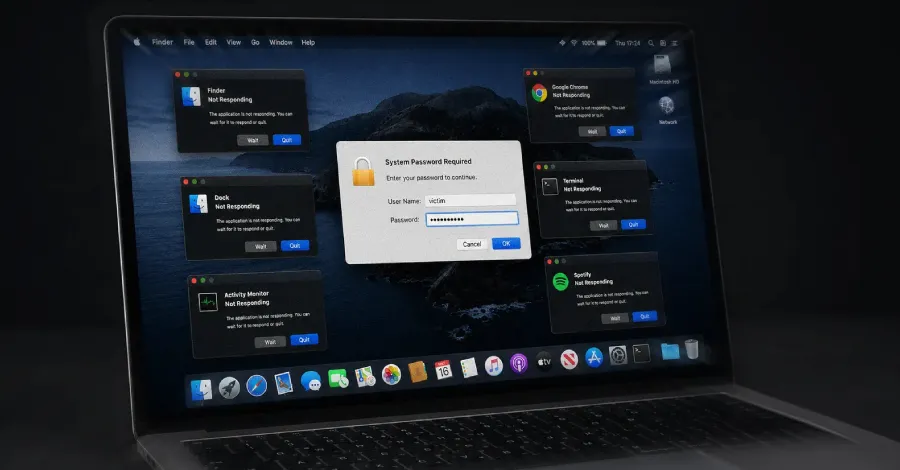
In a world increasingly dependent on technology, cybersecurity threats continue to evolve, becoming more sophisticated and insidious. One of the latest threats to emerge is the ClickLock malware, a malicious program specifically targeting macOS users. Its unique mechanism of action, which disables applications every 210 milliseconds until the victim inputs their password, presents a new frontier in the battle against cybercrime. This article delves into the mechanics of ClickLock, its implications for users and organizations, and essential steps to enhance security against such vulnerabilities.
Understanding ClickLock: A New Era of Cyber Threats
ClickLock is not just another piece of malware; it represents a shift in how cybercriminals approach attacks on macOS systems. Designed to exploit the trust users place in their operating systems, ClickLock employs a relentless method of application disruption. Every 210 milliseconds, any open application on the victim's device is killed, forcing users to re-enter their passwords repeatedly. This tactic serves two purposes: it frustrates the user and increases the likelihood of them making a mistake, potentially leading to the compromise of sensitive information.
The Technical Mechanics of ClickLock
The technical workings of ClickLock reveal a carefully crafted strategy aimed at exploiting user behavior. By creating an environment where users are pressured to enter their passwords, the malware can potentially capture keystrokes, leading to further data breaches. This underscores a core principle in cybersecurity: the human element often proves to be the weakest link in the security chain.

The Broader Implications of ClickLock
The emergence of ClickLock highlights several broader implications for both individual users and organizations. Firstly, it emphasizes the need for a multi-layered approach to cybersecurity that goes beyond traditional antivirus solutions. Organizations must recognize that simply having antivirus software installed is no longer sufficient. They need to adopt a proactive stance that includes employee training, regular software updates, and advanced threat detection mechanisms.
Who is Affected by ClickLock?
While ClickLock primarily targets macOS users, its implications extend far beyond this demographic. Organizations that operate in sectors with sensitive data, such as finance, healthcare, and education, are particularly vulnerable. Additionally, as remote work becomes more prevalent, the likelihood of encountering ClickLock increases, especially if employees are using personal devices that may lack robust security measures.
5 Steps to Secure Against Software Vulnerabilities
With threats like ClickLock on the rise, organizations must take proactive steps to safeguard their systems. Here are five essential measures to consider:
- Regular Software Updates: Ensure that all software, particularly operating systems and applications, are updated regularly to patch vulnerabilities.
- Employee Training: Invest in cybersecurity training for employees to help them recognize potential threats and understand best practices for password management.
- Advanced Threat Detection: Implement advanced threat detection systems that use AI and machine learning to identify suspicious behavior before it becomes a significant issue.
- Multi-Factor Authentication (MFA): Encourage or mandate the use of MFA wherever possible to add an additional layer of security on top of traditional passwords.
- Incident Response Plans: Develop and regularly update an incident response plan to ensure that your organization can quickly react to any security breaches.
Why It Matters: The Cost of Inaction
Ignoring threats like ClickLock can have severe consequences. The financial ramifications of a data breach can be staggering. According to a 2020 report by IBM, the average cost of a data breach in the United States was $8.64 million. Beyond the immediate financial impact, organizations may also suffer reputational damage, loss of customer trust, and legal repercussions. Therefore, investing in cybersecurity measures is not merely a cost; it is a necessary investment in the future of the business.

Key Takeaways
- ClickLock malware disrupts macOS applications every 210 milliseconds until a password is entered, posing a significant threat.
- Organizations must adopt a multi-layered approach to cybersecurity, combining technology with employee training.
- Five essential security steps include regular software updates, employee training, advanced threat detection, multi-factor authentication, and incident response plans.
- The cost of inaction regarding cybersecurity threats can be substantial, impacting both finances and reputation.
Frequently Asked Questions
What should I do if I suspect my system is infected with ClickLock?
If you suspect your system is infected with ClickLock or any other malware, the first step is to disconnect your device from the internet to prevent further data compromise. Next, run a thorough antivirus scan using reputable security software. If the malware persists, consider reaching out to a cybersecurity professional for assistance in removing the threat and restoring your system's integrity.
How can organizations ensure their employees are prepared for cybersecurity threats?
Organizations can prepare their employees for cybersecurity threats through regular training sessions and awareness programs. These should cover topics like recognizing phishing attempts, understanding the importance of strong passwords, and the proper protocols for reporting suspicious activity. Providing resources such as newsletters or online courses can also be beneficial in keeping cybersecurity top of mind.
Is macOS more secure than other operating systems?
While macOS is generally considered more secure than some other operating systems due to its Unix-based architecture and built-in security features, it is not invulnerable. As the popularity of macOS increases, so does the interest from cybercriminals. Therefore, users must remain vigilant and adopt proactive security measures regardless of their operating system.
Comments
San Francisco's Autonomous Vehicle Dilemma: Mayor Calls for Stricter Regulations
Following a significant traffic jam caused by Waymo's autonomous vehicles, San Francisco Mayor Daniel Lurie is advocating for tighter regulations to ensure safer operations during emergencies. This incident raises critical questions about the reliability of self-driving technology in urban environments.

Related articles



Popular in Cybersecurity
- Federal Mandate for Autonomous Vehicles: A Call for Safety Compliance
- EU Mandates Google to Share Data and Open AI on Android: What It Means
- GitHub Revamps Bug Bounty Program: Implications for Developers and Security
- Australian Government Disables Thousands of Functional Broadband Routers: A Wasteful Decision
- Exploiting Redis: Understanding Zero-Day Vulnerabilities and Their Mitigation