Combating OkoBot: Protecting Your Crypto Wallets from Phishing Attacks
The emergence of the OkoBot malware framework poses a significant threat to cryptocurrency users by targeting popular wallet applications. This article explores the implications of such vulnerabilities and offers actionable insights on securing digital assets.
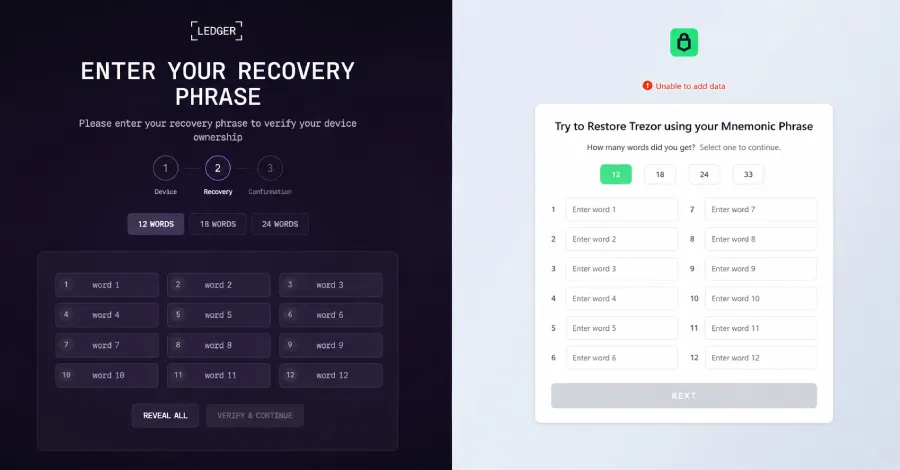
The world of cryptocurrency has revolutionized the way we perceive and manage digital assets. However, with innovation comes risk, particularly in the form of malware targeting cryptocurrency wallets. The recent emergence of the OkoBot malware framework has raised alarm bells among users of popular wallet applications like Ledger and Trezor. By injecting seed phrase phishing into these apps, OkoBot poses a serious threat to the security of digital assets. This article delves into the mechanics of OkoBot, its implications for cryptocurrency users, and essential steps to safeguard against such sophisticated attacks.
Understanding the OkoBot Malware Framework
OkoBot is a malware framework specifically designed to exploit vulnerabilities in cryptocurrency wallet applications. By targeting apps that manage and store users' private keys and seed phrases, OkoBot facilitates phishing attacks that can lead to the theft of digital assets. This type of attack is particularly insidious as it can occur without the user’s knowledge, embedding itself into trusted applications that users regularly use.
The Mechanics of OkoBot
At its core, OkoBot utilizes social engineering tactics to deceive users into revealing sensitive information. It operates by injecting malicious code into the Ledger and Trezor applications, creating fraudulent interfaces that mimic legitimate login screens. When users attempt to access their wallets, they are unknowingly directed to these fake screens where they are prompted to enter their seed phrases.
- Phishing Techniques: OkoBot employs a range of phishing techniques, utilizing urgency and fear to prompt users to act quickly.
- Seed Phrase Theft: The malware captures the entered seed phrases and sends them to malicious actors, who can then access the victim's cryptocurrency funds.
- Invisibility: Because the malware functions within legitimate applications, users may remain unaware of the threat, making detection and prevention challenging.
The Implications of OkoBot on Cryptocurrency Security
The implications of OkoBot’s activity are profound, especially as more individuals and institutions adopt cryptocurrency for various transactions. The trust users place in established wallet applications is being undermined by the potential for such malware. As the cryptocurrency market continues to grow, so does the incentive for cybercriminals to develop more sophisticated tools like OkoBot.
Who is Affected?
OkoBot primarily targets individual cryptocurrency holders who utilize wallets like Ledger and Trezor for asset storage. However, the ramifications extend beyond individual users; businesses that accept cryptocurrency payments or manage cryptocurrency assets on behalf of clients are equally at risk. This creates a ripple effect where a breach could lead to significant financial losses and damage to reputation.

Safeguarding Against Phishing Attacks
Given the evolving landscape of cyber threats, it is imperative for cryptocurrency users to remain vigilant and proactive in safeguarding their digital assets. Here are five essential steps that organizations and individuals can implement to protect against vulnerabilities exacerbated by malware like OkoBot:
1. Regular Software Updates
Ensure that your wallet applications and operating systems are up-to-date. Software updates often include security patches that address known vulnerabilities. By keeping your software current, you reduce the risk of exploitation.
2. Enable Two-Factor Authentication (2FA)
Implementing 2FA adds an additional layer of security. Even if a user's seed phrase is compromised, the attacker would need a second form of authentication to access the wallet.
3. Educate Users
Education is key to preventing phishing attacks. Users should be trained to recognize warning signs of phishing attempts, such as suspicious links or requests for sensitive information.
4. Use Hardware Wallets
For enhanced security, consider using hardware wallets that store private keys offline. These wallets are less susceptible to malware attacks and provide an added layer of protection.
5. Monitor for Unusual Activity
Regularly monitor your wallet for any unusual transactions. Prompt detection of unauthorized access can mitigate potential losses.

Key Takeaways
- OkoBot is a new malware framework that targets cryptocurrency wallets for phishing attacks.
- Users of Ledger and Trezor are particularly at risk, as the malware injects itself into these applications.
- Proactive security measures such as software updates and 2FA are essential to safeguard digital assets.
- Education and awareness about phishing tactics can significantly reduce the risk of falling victim to attacks.
- Monitoring wallet activity can help detect unauthorized access early, preventing significant losses.
Frequently Asked Questions
What should I do if I suspect my wallet has been compromised?
If you suspect that your wallet has been compromised, immediately disconnect it from the internet and any networks. Change your passwords and enable two-factor authentication if you haven't already. Consider transferring your assets to a new wallet that has not been affected. It's crucial to act quickly to mitigate potential losses.
How can I tell if my wallet application is safe to use?
To determine if your wallet application is safe, ensure that you download it from official sources, such as the Ledger or Trezor websites. Check for recent reviews and feedback from users regarding its security features. Additionally, keep an eye out for software updates and security patches from the developers.
What are the signs of a phishing attack?
Common signs of a phishing attack include unsolicited messages asking for sensitive information, urgency in the request, and unfamiliar links or email addresses. Always verify the source before entering any personal information, and be cautious of messages that seem out of character for the sender.
Comments
San Francisco's Autonomous Vehicle Dilemma: Mayor Calls for Stricter Regulations
Following a significant traffic jam caused by Waymo's autonomous vehicles, San Francisco Mayor Daniel Lurie is advocating for tighter regulations to ensure safer operations during emergencies. This incident raises critical questions about the reliability of self-driving technology in urban environments.

Related articles




Popular in Cybersecurity
- Federal Mandate for Autonomous Vehicles: A Call for Safety Compliance
- EU Mandates Google to Share Data and Open AI on Android: What It Means
- GitHub Revamps Bug Bounty Program: Implications for Developers and Security
- Australian Government Disables Thousands of Functional Broadband Routers: A Wasteful Decision
- Exploiting Redis: Understanding Zero-Day Vulnerabilities and Their Mitigation