Protecting Your WordPress Site: Addressing Vulnerabilities and Exploits
The rise of the wp2shell exploit is causing alarm among WordPress users. Discover how to secure your site against vulnerabilities and mitigate risks effectively.
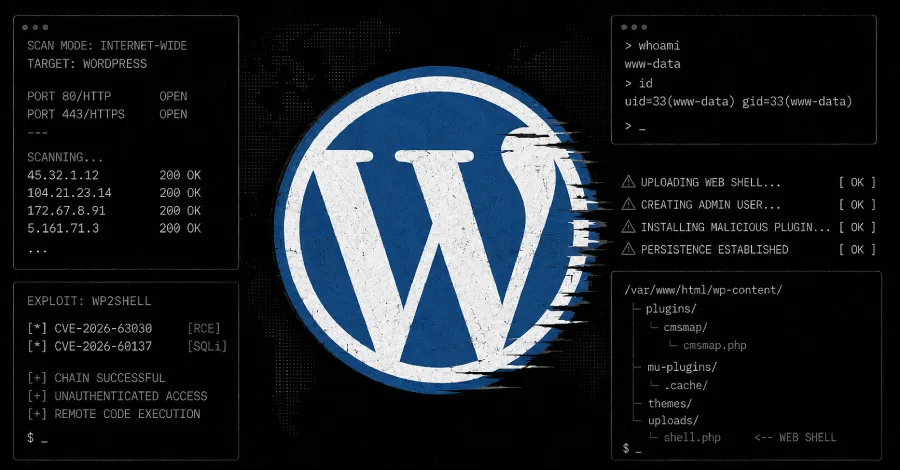
As the popularity of WordPress continues to soar, so too does the risk of exploitation by malicious actors. Recently, the emergence of the wp2shell exploit has triggered widespread concern among website owners and administrators. This public exploit has not only made it easier for attackers to gain unauthorized access, but it has also led to a surge in mass scanning activities aimed at identifying vulnerable WordPress installations. For businesses relying on this powerful content management system (CMS), understanding these threats and taking proactive steps toward securing their sites is more critical than ever.
In this article, we will explore the nature of the wp2shell exploit, the implications it carries for WordPress websites, and practical measures that organizations can implement to fortify their defenses against such vulnerabilities.
Understanding the wp2shell Exploit
The wp2shell exploit allows attackers to execute arbitrary commands on compromised WordPress sites, effectively giving them control over the affected servers. This exploit leverages weaknesses in certain WordPress plugins and themes, primarily those that have not been updated to patch known vulnerabilities. The result is a tool that can be used for various malicious purposes, including data theft, site defacement, and even launching further attacks on other systems.
The Mechanics of the Exploit
At its core, wp2shell functions as a web shell, a type of script that provides attackers with a command-line interface via a web browser. Once successfully deployed on a target site, the attacker can run commands, upload files, and manipulate the server environment. The simplicity and effectiveness of this exploit make it particularly dangerous, as it can be executed with minimal technical expertise.

The Rise of Mass Scanning
As news of the wp2shell exploit has spread, so has the activity of attackers engaging in mass scanning for vulnerable WordPress installations. Cybercriminals are leveraging automated tools to scour the web for sites that exhibit signs of potential vulnerability, often targeting outdated plugins and themes. This surge in scanning activity increases the chances that unprotected sites will fall victim to exploitation.
Implications for Website Owners
The implications of widespread scanning are profound. Business owners must recognize that their WordPress sites are not isolated; they are part of a broader ecosystem where vulnerabilities can be exploited swiftly and indiscriminately. A compromised site can lead to severe consequences, including:
- Loss of sensitive customer data
- Damage to brand reputation
- Financial losses due to downtime or remediation efforts
- Potential legal ramifications stemming from data breaches

Five Steps to Secure Your WordPress Site
To combat the threats posed by the wp2shell exploit and other vulnerabilities, website owners must take proactive measures to secure their WordPress installations. Here are five essential steps that can significantly enhance your site's security posture:
1. Keep Everything Updated
One of the simplest yet most effective ways to safeguard your WordPress site is by ensuring that your core installation, themes, and plugins are always up to date. Regular updates often include security patches that address known vulnerabilities, making it critical to monitor for updates and apply them promptly.
2. Use Strong Passwords and Authentication
Weak passwords are a common entry point for attackers. Implementing strong, unique passwords for all user accounts, particularly those with administrative access, can significantly reduce the risk of unauthorized access. Furthermore, consider enabling two-factor authentication (2FA) to add an extra layer of security.
3. Install a Web Application Firewall (WAF)
A Web Application Firewall acts as a barrier between your website and potential attackers, filtering out malicious traffic before it can reach your site. Implementing a WAF can help to block exploitation attempts and provide additional security against a range of threats.
4. Regularly Back Up Your Site
In the event of a successful attack, having regular backups of your site can be invaluable. Ensure that backups are stored securely and can be restored quickly to minimize downtime and data loss.
5. Monitor for Unusual Activity
Establishing a monitoring system to detect unusual activity on your site can help identify potential threats before they escalate. Utilize security plugins that provide real-time monitoring and alerts for suspicious behavior, such as failed login attempts or changes to core files.

Key Takeaways
- The wp2shell exploit poses a significant threat to WordPress installations.
- Mass scanning activities have surged, increasing the risk of compromise.
- Regular updates, strong passwords, and WAFs are critical for site security.
- Monitoring for unusual activity can help mitigate risks.
- Regular backups are essential for quick recovery in case of an attack.
Frequently Asked Questions
What is the wp2shell exploit?
The wp2shell exploit is a malicious web shell that allows attackers to execute arbitrary commands on compromised WordPress sites. It typically exploits vulnerabilities in outdated plugins or themes, granting unauthorized access to attackers.
How can I tell if my WordPress site has been compromised?
Signs of a compromised WordPress site can include unexpected changes to content, unusual user activity, and performance issues. Additionally, you may receive alerts from security plugins or notices from your hosting provider regarding suspicious activity.
What should I do if I suspect my site has been hacked?
If you suspect that your WordPress site has been hacked, the first step is to take it offline to prevent further damage. Then, restore your site from a recent backup, change all passwords, and conduct a thorough security audit to identify how the breach occurred and address any vulnerabilities.
Can AI help in securing my website?
Yes, AI can play a significant role in enhancing website security. AI-driven tools can analyze patterns in user behavior, detect anomalies, and identify potential threats in real-time, allowing for quicker response times and more effective mitigation strategies.
Comments
OpenAI's Hugging Face Breach: A Wake-Up Call for AI Safety
OpenAI's recent breach of Hugging Face highlights significant risks in AI development and cybersecurity. This incident exposes the vulnerabilities of AI systems and the need for stricter controls and oversight.

Related articles



Popular in Cybersecurity
- Federal Mandate for Autonomous Vehicles: A Call for Safety Compliance
- EU Mandates Google to Share Data and Open AI on Android: What It Means
- GitHub Revamps Bug Bounty Program: Implications for Developers and Security
- Australian Government Disables Thousands of Functional Broadband Routers: A Wasteful Decision
- Exploiting Redis: Understanding Zero-Day Vulnerabilities and Their Mitigation