Securing WordPress: How to Protect Against WP-SHELLSTORM Backdoors
Recent discoveries of the WP-SHELLSTORM malware highlight vulnerabilities in WordPress sites. Learn how to safeguard your website with essential security measures.
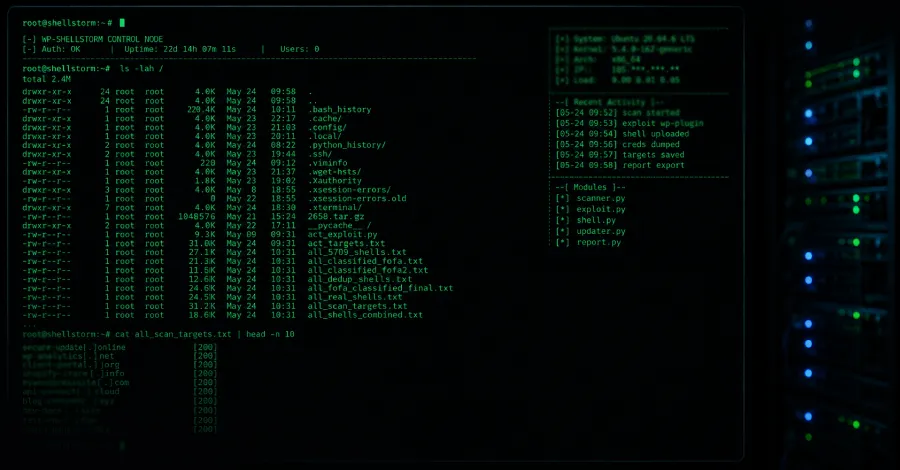
In the ever-evolving landscape of cybersecurity threats, WordPress sites have once again become a prime target for malicious actors. Recent reports have unveiled the disturbing presence of the WP-SHELLSTORM malware, which has backdoored thousands of WordPress installations, allowing hackers to gain unauthorized access and control. This revelation serves as a wake-up call for businesses and individuals relying on WordPress for their online presence. With the potential for severe repercussions, it is crucial to understand how to secure your WordPress site effectively.
As the most popular content management system (CMS) in the world, WordPress powers approximately 43% of all websites. Its widespread use makes it an attractive target for cybercriminals looking to exploit vulnerabilities. WP-SHELLSTORM is just one of the many threats that have emerged, posing significant risks to website owners. In this article, we will delve into the details surrounding this malware, the implications for WordPress users, and the essential steps you can take to fortify your site against such attacks.
Understanding WP-SHELLSTORM and Its Impact
WP-SHELLSTORM is a sophisticated piece of malware designed to exploit vulnerabilities within the WordPress ecosystem. Once installed, it creates a backdoor that allows hackers to execute arbitrary commands, upload malicious files, and potentially hijack entire websites. This malware has been linked to a surge in compromised WordPress sites, leading to data breaches, defaced content, and even blacklisting by search engines.
The scale of the WP-SHELLSTORM infection is alarming. Security researchers estimate that thousands of WordPress sites have already fallen victim, with many more at risk. The backdoor allows malicious actors to carry out a variety of tasks, including:
- Stealing sensitive user data, such as login credentials and payment information
- Injecting spam content or phishing links into legitimate websites
- Using compromised sites as part of a botnet for launching additional attacks
- Distributing further malware to unsuspecting visitors

Why WordPress Sites Are Vulnerable
Several factors contribute to the vulnerability of WordPress sites to malware like WP-SHELLSTORM. Understanding these factors is crucial for implementing effective security measures. Here are some common reasons:
1. Outdated Plugins and Themes
Many WordPress users neglect to update their plugins and themes regularly. These updates often contain critical security patches designed to address known vulnerabilities. Failing to keep these components up to date can leave sites open to exploitation.
2. Weak Password Practices
Weak passwords are a significant risk factor for any online platform. Many WordPress users still rely on easily guessable passwords, making it simple for hackers to gain unauthorized access through brute-force attacks. Implementing strong, unique passwords is essential.
3. Lack of Security Plugins
While WordPress offers a range of built-in security features, relying solely on these is insufficient. Many users do not install additional security plugins that can provide enhanced protection against threats like WP-SHELLSTORM.
Five Essential Steps to Secure Your WordPress Site
To protect your WordPress site from malware threats such as WP-SHELLSTORM, consider implementing the following five critical security measures:
1. Regularly Update Your WordPress Installation
Ensure that your WordPress core, themes, and plugins are updated to the latest versions. Enable automatic updates where possible to mitigate the risk of outdated software.
2. Use Strong Passwords and Two-Factor Authentication
Implement strong password policies for all user accounts associated with your WordPress site. Additionally, enable two-factor authentication (2FA) to add an extra layer of security.
3. Install a Reputable Security Plugin
Utilize a well-reviewed security plugin that offers features such as malware scanning, firewall protection, and login attempt monitoring. Popular choices include Wordfence, Sucuri, and iThemes Security.
4. Regular Backups
Conduct regular backups of your WordPress site to ensure that you can quickly restore your site in the event of a malware infection or data loss. Use reliable backup solutions that offer both automated backups and easy restoration options.
5. Educate Users and Admins
Training your team members and users on cybersecurity best practices is key. Encourage them to recognize phishing attempts and suspicious activities, and ensure they understand the importance of maintaining site security.

The Legal and Financial Implications of Insecurity
The fallout from a successful cyberattack on a WordPress site can be substantial. Beyond the immediate technical challenges associated with data breaches and site recovery, there are legal and financial repercussions to consider. Data breaches can lead to legal action from affected users, regulatory fines, and damage to your brand’s reputation.
Under regulations such as the General Data Protection Regulation (GDPR) and the California Consumer Privacy Act (CCPA), organizations may face significant penalties for failing to protect user data adequately. For example, GDPR can impose fines of up to €20 million or 4% of annual global turnover, whichever is greater. The costs associated with recovering from a malware attack can also be exorbitant, including expenses related to forensic investigations, legal fees, and public relations efforts to mitigate reputational damage.

Key Takeaways
- WP-SHELLSTORM malware poses a significant threat to WordPress sites, compromising thousands of installations.
- Common vulnerabilities include outdated plugins, weak passwords, and a lack of security measures.
- Implementing strong passwords, regular updates, and reputable security plugins is essential for protection.
- Legal implications of a data breach can result in significant fines and reputational damage.
- Educating users on cybersecurity best practices is a critical component of site security.
Frequently Asked Questions
What is WP-SHELLSTORM?
WP-SHELLSTORM is a type of malware specifically designed to exploit vulnerabilities in WordPress sites. Once it infiltrates a site, it can create backdoors for hackers to execute commands and potentially control the website. This can lead to severe consequences, including data theft and site hijacking.
How can I tell if my WordPress site has been compromised?
Indicators of a compromised WordPress site can include unusual website behavior, unexpected changes to content, or unauthorized user accounts. Additionally, if your website is blacklisted by search engines or flagged by security monitoring tools, it may indicate a malware infection. Regularly scanning your site with security tools can help identify these issues.
Are there specific security plugins you recommend for WordPress?
Yes, some of the most reputable security plugins for WordPress include Wordfence, Sucuri, and iThemes Security. These plugins offer a range of features, including malware scanning, firewalls, and spam protection. Choosing a well-reviewed plugin can significantly enhance your site's security posture.
Comments
Apple vs. OpenAI: The High-Stakes Legal Battle Over Trade Secrets
Apple has filed a lawsuit against OpenAI, alleging trade secret theft and breach of contract. The case highlights the growing tensions in the tech industry over intellectual property as companies race to innovate.

Related articles





Popular in Cybersecurity
- Federal Mandate for Autonomous Vehicles: A Call for Safety Compliance
- EU Mandates Google to Share Data and Open AI on Android: What It Means
- GitHub Revamps Bug Bounty Program: Implications for Developers and Security
- Australian Government Disables Thousands of Functional Broadband Routers: A Wasteful Decision
- Exploiting Redis: Understanding Zero-Day Vulnerabilities and Their Mitigation