Google Introduces Selfie Sign-In: A New Era of Account Recovery
Google's innovative selfie sign-in feature aims to simplify account recovery by allowing users to log in with a video of their face. This new method raises questions about security and privacy.
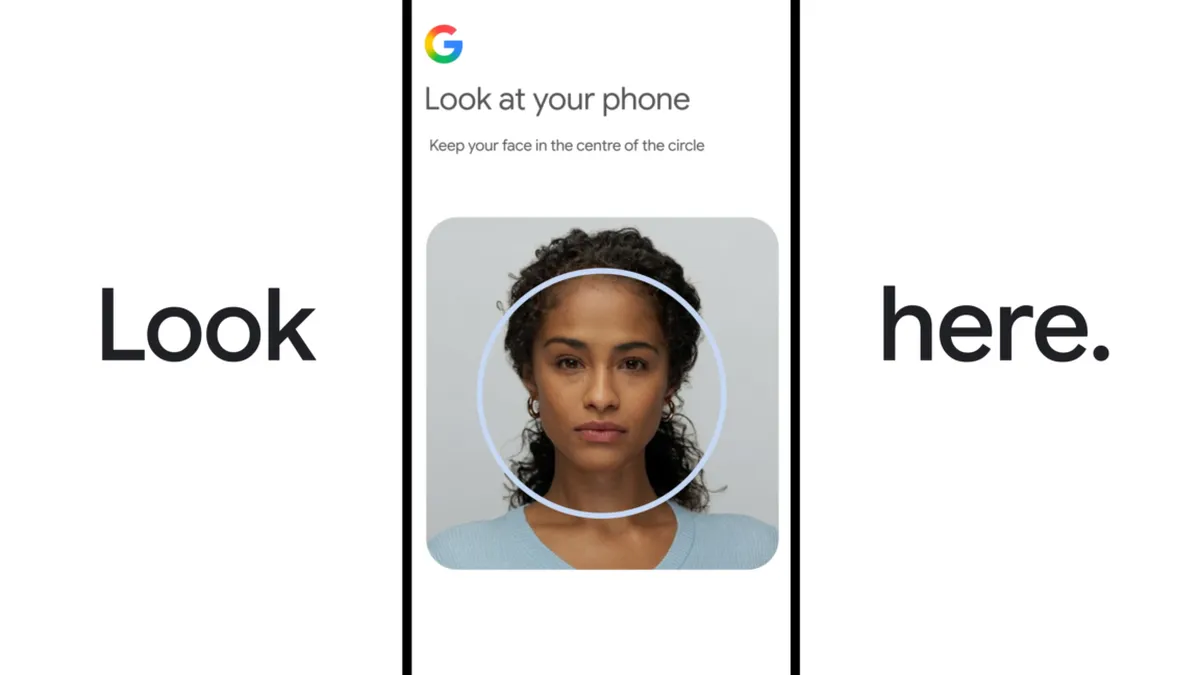
In an age where digital identities are increasingly at risk, Google has just rolled out an innovative new feature designed to streamline account recovery: the ability to log in using a selfie video. This move not only enhances user convenience but also prompts a critical examination of privacy, security, and the implications of biometric authentication in our daily digital interactions. With this development, Google is positioning itself at the forefront of a new wave of identity verification that leverages advanced artificial intelligence (AI) technologies.
Gone are the days when forgetting your password meant navigating a labyrinth of recovery emails, two-factor authentication codes, and frustrating waiting periods. With Google’s selfie sign-in, users can now regain access to their accounts by simply recording a short video of their face. This method promises a level of ease that could become the norm in digital account management. However, as with any new technology, it raises important questions about security and the handling of biometric data.
The Mechanics of Selfie Sign-In
To utilize this new feature, users must first enable selfie sign-in during their account setup. It's important to note that not all Google account types are eligible for this feature; specifically, Workspace accounts, child accounts, or those enrolled in Google’s Advanced Protection Program cannot access this option. Once eligibility is confirmed, users can record a video of their face, which Google stores securely on its servers, encrypted to protect privacy.
Setting Up the Feature
- Ensure your account type is eligible.
- Record a video following on-screen instructions.
- Choose whether to opt-in for Google to use your video to enhance its facial recognition technology.
During the recording process, users are prompted to move their heads in various directions. This action helps Google’s algorithms accurately map the user’s facial features, creating a digital profile that can be matched against future selfies taken during the login process. In the event that a user needs to log in using their selfie, they will again be asked to move their head to confirm that they are a live person, ensuring that the system is not being tricked by static images or deepfake videos.

Security Implications of Biometric Authentication
While the convenience of selfie sign-in is undeniable, it is essential to address the security implications of using biometric data for authentication. Concerns about deepfakes have grown in recent years, as technology has advanced to a point where it is possible to create highly realistic fake videos that could potentially fool facial recognition systems. Google claims to have implemented multiple layers of security to detect such deepfakes, but skepticism remains about whether these measures are sufficient.
Comparison with Traditional Methods
Selfie sign-in presents a different risk profile compared to traditional methods like passwords and two-factor authentication (2FA). While passwords can be reset and 2FA can provide an additional layer of security, biometric data is inherently more difficult to change. If a user's facial data were compromised, it could lead to severe repercussions, as there’s no way to simply “reset” one's face.
Privacy Considerations
Google has made promises regarding the privacy of the selfie videos, stating that these will be encrypted and not used for other purposes unless users opt in. However, the question of trust remains. Users must weigh the convenience of this feature against the potential risks to their privacy. Google allows users the option to delete their videos at any time from their account settings, but this raises another question: How long is the video stored before deletion, and what happens if a user forgets to delete it?
Managing Your Data
For those concerned about privacy, it is crucial to understand the data management options available. Users can access their privacy settings to review what information is stored and make informed decisions about their participation in new features like selfie sign-in. As the tech landscape evolves, users should remain vigilant about how their data is handled.

Who Stands to Benefit?
Google's selfie sign-in feature is designed to benefit a wide range of users, particularly those who frequently forget their passwords or find traditional recovery methods cumbersome. It is also likely to appeal to younger generations who are more comfortable with biometric technology and may prioritize convenience over privacy concerns. However, it’s worth noting that users who require heightened security — such as those with sensitive information in their accounts — may hesitate to adopt this feature, especially those enrolled in Google’s Advanced Protection Program.
The Future of Biometric Authentication
As technology continues to advance, biometric authentication methods like facial recognition are becoming increasingly common. Google’s foray into selfie sign-in is just one example of how companies are seeking to simplify user experiences while grappling with the complexities of security and privacy. As users, it’s essential to stay informed about these developments and consider how they impact our digital lives.

Key Takeaways
- Google's selfie sign-in allows users to regain account access using a video of their face.
- This feature enhances convenience but raises security and privacy concerns.
- Not all Google accounts are eligible for selfie sign-in; users must check their account type.
- Users can delete their selfie video at any time, but must consider data management implications.
- As biometric authentication advances, users should remain vigilant about their digital privacy.
Frequently Asked Questions
Is the selfie sign-in feature secure?
Google has implemented multiple security measures to detect deepfakes and ensure the integrity of the selfie sign-in feature. However, users must consider that biometric data, once compromised, cannot be easily changed like passwords. Therefore, while Google strives for security, the risk profile is different when using facial recognition as a primary method of authentication.
What happens to my selfie video after I record it?
Once you record your selfie video, it is stored securely on Google’s servers in an encrypted format. Users have the option to delete their video at any time via their account settings. It's advisable to regularly review privacy settings to understand what data is stored and ensure your preferences are respected.
Can I still use passwords with selfie sign-in?
Yes, users can still use traditional passwords alongside the selfie sign-in feature. The new method is an optional enhancement rather than a replacement for existing authentication methods. Users can choose to enable or disable selfie sign-in based on their comfort level with biometric authentication.
What types of accounts are not eligible for selfie sign-in?
Selfie sign-in is not available for Workspace accounts, child accounts, or accounts enrolled in Google’s Advanced Protection Program. It’s essential to check your account type to determine eligibility before attempting to set up this feature.
Comments
Bridging the Agent Security Gap: AI Incidents on the Rise
A significant number of enterprises are facing security incidents involving AI agents. Despite this, many organizations lack the necessary controls to mitigate these risks, raising serious concerns about the future of AI security.

Related articles





Popular in Cybersecurity
- Federal Mandate for Autonomous Vehicles: A Call for Safety Compliance
- EU Mandates Google to Share Data and Open AI on Android: What It Means
- GitHub Revamps Bug Bounty Program: Implications for Developers and Security
- Australian Government Disables Thousands of Functional Broadband Routers: A Wasteful Decision
- Exploiting Redis: Understanding Zero-Day Vulnerabilities and Their Mitigation