Understanding Browser Fingerprinting: The New Face of Cyber Threats
Discover how browser fingerprinting is being used to conceal macOS malware and what it means for cybersecurity.
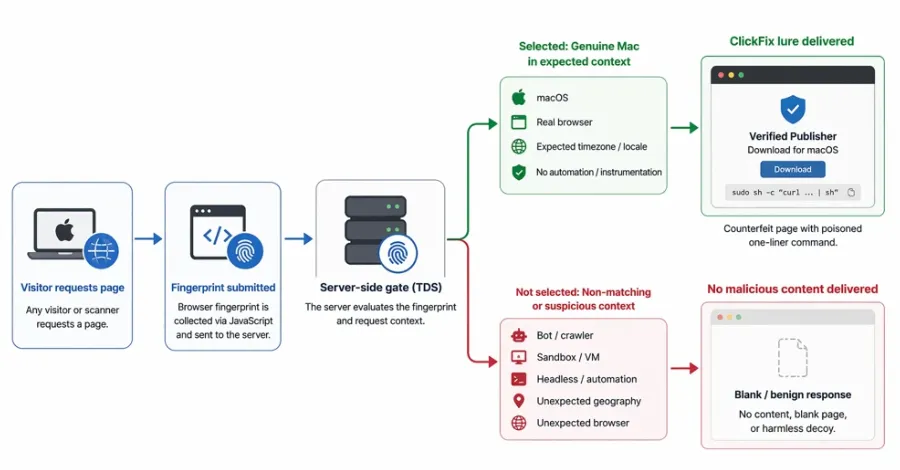
As cyber threats evolve, new techniques emerge that not only amplify the scope of attacks but also complicate defenses. One such technique is browser fingerprinting, a method that allows malicious actors to track and identify users based on unique browser and device characteristics. Recent reports indicate that over 250 domains associated with ClickFix are utilizing browser fingerprinting to deploy lures for macOS malware. This alarming trend raises pressing questions about cybersecurity practices and the need for enhanced protective measures.
In the world of cyberattacks, understanding the tools and methods employed by adversaries is crucial for developing effective defensive strategies. Browser fingerprinting poses a significant challenge, particularly for organizations that rely on web applications and cloud services. As these methods become more sophisticated, businesses must adapt their security protocols to mitigate risks and protect sensitive data.
What is Browser Fingerprinting?
Browser fingerprinting is a tracking technique that collects information about a user's browser settings, installed plugins, operating system, and even device characteristics to create a unique digital signature. Unlike cookies, which can be deleted by users, browser fingerprints are much harder to eliminate. This makes them a potent tool for malicious actors looking to track user behavior or deliver targeted malware.
How It Works
The process of creating a browser fingerprint involves gathering various data points, including:
- User agent string: Information about the browser, its version, and the operating system.
- Screen resolution: The dimensions of the user's display.
- Installed fonts: A list of fonts available on the user's system.
- Time zone: The local time zone of the user.
- Browser plugins: Details about installed plugins that may reveal additional information about the user.
This data is then compiled to form a unique identifier that can be used to track users across different websites and sessions, even if they clear their cookies or use incognito mode.

The ClickFix Domains and Malware Threats
According to security researchers, over 250 domains associated with ClickFix have been found to leverage browser fingerprinting techniques to facilitate the deployment of macOS malware. This revelation underscores the growing trend of using sophisticated tracking methods in cyberattacks. The implications of such attacks can be severe, leading to unauthorized data access, financial loss, and reputational damage for organizations.
Understanding the ClickFix Connection
ClickFix is a platform that offers various services related to online advertising and analytics. By integrating browser fingerprinting into their operations, these domains can effectively hide their malicious activities while targeting unsuspecting macOS users. This is especially concerning given the increasing market share of macOS devices, which have become attractive targets for cybercriminals.
Attackers often lure users into downloading malicious software disguised as legitimate applications or updates. Once installed, this malware can provide attackers with access to sensitive files, keystrokes, and even control over the user's device. The use of browser fingerprinting not only assists in delivering these lures but also helps maintain persistence, allowing attackers to continue tracking their targets even after initial engagement.

The Impact on Organizations and Users
As the threat landscape evolves, organizations must understand how browser fingerprinting affects their cybersecurity posture. Here are some critical impacts:
- Increased Risk of Data Breaches: With sophisticated tracking methods, attackers can gain unauthorized access to sensitive data.
- Challenges in Compliance: Adhering to regulations such as GDPR and CCPA becomes more complex when tracking methods are covert.
- Reputation Damage: Organizations suffering data breaches face long-term reputational harm among customers and partners.
Moreover, users are not immune to the consequences of these attacks. Individuals whose devices are compromised may face identity theft, financial loss, and the loss of personal privacy.
Mitigating the Risks of Browser Fingerprinting
To combat the threats posed by browser fingerprinting and associated malware, organizations should consider implementing the following strategies:
- Enhance User Education: Training employees about cybersecurity risks and safe browsing practices can significantly reduce the likelihood of malware infections.
- Adopt Stronger Authentication Methods: Implementing multi-factor authentication (MFA) can help protect sensitive accounts from unauthorized access.
- Regular Software Updates: Keeping software and systems up-to-date ensures that known vulnerabilities are patched, reducing the attack surface.
- Use Privacy-Focused Browsers: Encourage the use of browsers that offer enhanced privacy features, reducing the chances of successful tracking.

Key Takeaways
- Browser fingerprinting is a sophisticated tracking method that poses significant cybersecurity challenges.
- Over 250 ClickFix domains exploit this technique to deploy macOS malware, increasing risks for organizations and users alike.
- Effective mitigation strategies include user education, stronger authentication, and regular software updates.
Frequently Asked Questions
What steps can organizations take to protect against browser fingerprinting?
Organizations can adopt several strategies to safeguard against browser fingerprinting, including implementing robust cybersecurity training for employees, utilizing multi-factor authentication, and ensuring regular software updates. Additionally, using privacy-focused web browsers can help minimize tracking risks.
How can individuals defend themselves from malware threats related to browser fingerprinting?
Individuals can protect themselves by being cautious with unsolicited downloads and links, using reputable antivirus software, and regularly updating their operating systems. Moreover, being aware of their browser settings and using privacy-focused tools can help mitigate risks.
What is the significance of the ClickFix domains in the context of this threat?
The ClickFix domains are significant as they illustrate a growing trend in cyberattacks that combine sophisticated tracking techniques with malware deployment. By utilizing browser fingerprinting, these domains can effectively target macOS users and evade detection, posing serious risks to personal and organizational data.
Comments
Understanding Identity Exposure: The Risks of Discounted Access and Active Attack Paths
Explore the implications of identity exposure in cybersecurity, particularly in the context of discounted access to sensitive systems. Learn how cross-domain privilege escalation can lead to severe breaches and what businesses can do to protect themselves.

Related articles






Popular in Cybersecurity
- Federal Mandate for Autonomous Vehicles: A Call for Safety Compliance
- EU Mandates Google to Share Data and Open AI on Android: What It Means
- GitHub Revamps Bug Bounty Program: Implications for Developers and Security
- Australian Government Disables Thousands of Functional Broadband Routers: A Wasteful Decision
- Exploiting Redis: Understanding Zero-Day Vulnerabilities and Their Mitigation