Chuwi Unibook Review: Affordable Laptop with Major Trade-offs
The Chuwi Unibook offers a budget-friendly alternative to mainstream laptops, but its performance and quality raise questions about its value. With mixed reviews on hardware and software, is this laptop worth your investment?
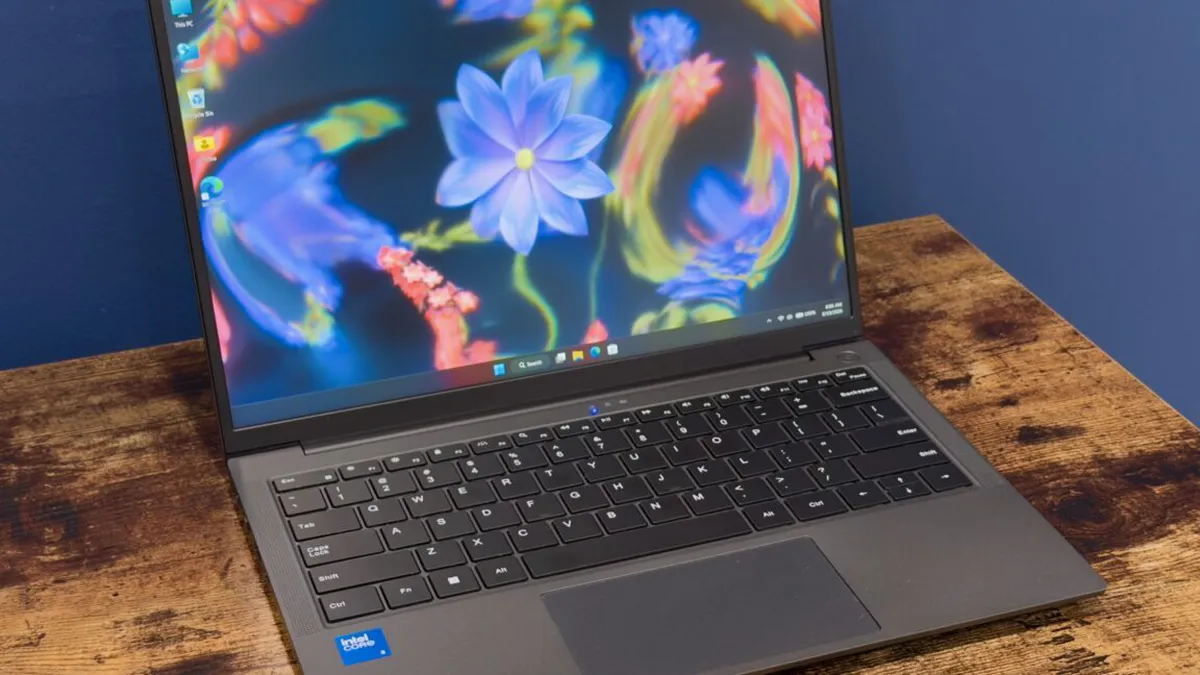
The Chuwi Unibook 304 has emerged as a notable player in the entry-level laptop market, aiming to provide a budget-friendly alternative to higher-end models like Apple's MacBook Neo. Priced at $449, the Unibook claims to offer decent specifications for those looking for a functional laptop without breaking the bank. However, as with many budget devices, the old adage "you get what you pay for" rings true, and prospective buyers should tread carefully before committing to this investment.
In a landscape where laptops are often either overpriced or underperforming, the Unibook presents a mixed bag of features, performance, and design. With the recent launch of Intel's Wildcat Lake processors, which promise to deliver better performance at lower price points, Chuwi has seized the opportunity to introduce a laptop that may appeal to bargain hunters. But does the Unibook deliver on its promises, or does it fall short in critical areas?
Design and Build Quality: First Impressions
The Chuwi Unibook sports a design that leans towards the generic, resembling various mid-range laptops like the Asus Zenbook. Its aluminum chassis has a thin profile, but it's worth noting that it may feel flimsy compared to more premium offerings. The overall design is functional but lacks the panache that attracts consumers to higher-end devices.
However, one of the Unibook’s strong points is its extensive port selection. Unlike many modern laptops that prioritize slimness over connectivity, the Unibook offers:
- Two USB-C ports
- One full-size HDMI port
- Two USB 3.0 ports
- One USB 2.0 port
- A microSD card slot
- A headphone jack
- A gigabit Ethernet port
This array of ports makes it easier for users to connect to various devices without needing additional adapters, a significant advantage in this price range.

Keyboard and Trackpad: A Mixed Experience
When it comes to typing experience, the Unibook’s keyboard is surprisingly decent. The keys provide a satisfactory tactile feel, and the backlit feature is a pleasant addition for low-light environments. However, it's worth noting that the keyboard does not include biometric login options, such as a fingerprint reader or facial recognition, which are becoming increasingly common in budget laptops.
On the other hand, the trackpad is a significant weak point. Users may find it stiff and unresponsive, making navigation frustrating. The clicking mechanism is loud, which detracts from the overall experience. While the trackpad offers basic functionality, it may be a deal-breaker for those who rely on it for productivity.
Display Quality: Expectations vs. Reality
The Chuwi Unibook features a 13-inch IPS display with a resolution of 1920 x 1200. While this specification sounds promising on paper, real-world performance reveals a different story. The screen brightness caps at around 300 nits, which may not be sufficient for outdoor use or bright environments. Furthermore, the display suffers from noticeable backlight bleeding and only provides about 59% coverage of the sRGB color gamut. This results in washed-out colors, particularly in shades of red and purple, which could disappoint users seeking a vibrant viewing experience.
Initially advertised with 100% sRGB coverage, Chuwi later clarified that only a higher-spec model, the Unibook 315, meets this standard. Unfortunately, this variant is not yet available for purchase, leaving consumers with a less-than-stellar display.

Performance: What to Expect
Equipped with an Intel Wildcat Lake processor, the Unibook aims to deliver adequate performance for everyday tasks. With 8GB of RAM and a 256GB SSD, it can handle basic applications, web browsing, and document editing. However, users should temper their expectations; this laptop is not designed for heavy multitasking or resource-intensive activities like gaming or video editing.
Furthermore, while the SSD is replaceable, the process is not entirely user-friendly. The bottom of the laptop is secured with 11 Philips-head screws, and while access to the SSD and Wi-Fi card is achievable, the lack of upgradeable components can deter tech enthusiasts who prefer customizable hardware.
Software and Support: Proceed with Caution
One of the most significant drawbacks of purchasing a Chuwi laptop is the uncertainty surrounding software support. With many budget laptops, especially those from lesser-known brands, users may find themselves lacking reliable driver and BIOS updates. In the case of the Unibook, the manufacturer’s support page was reportedly non-functional during the review period, raising red flags about future software maintenance.
Additionally, the Unibook comes pre-installed with a version of Microsoft Office that appears to have been activated through dubious means. This raises questions about the legality and security of the software. Users should be cautious about the potential for malware or other security vulnerabilities that could arise from using unverified software.
Key Takeaways
- Affordable Pricing: At an introductory price of $449, the Unibook is one of the more budget-friendly options available.
- Good Port Selection: It offers a wide range of connectivity options, surpassing many competitors.
- Decent Keyboard: The keyboard experience is reasonable, though lacking biometric features.
- Poor Display and Trackpad: The screen quality and trackpad performance are major drawbacks.
- Software Support Concerns: Potential issues with software updates and unverified installations may pose risks.
Frequently Asked Questions
Is the Chuwi Unibook worth the price?
While the Chuwi Unibook offers an attractive price point for budget-conscious consumers, its performance and build quality may not meet everyone's expectations. The extensive port selection and decent keyboard are strong points, but the poor display and trackpad performance could detract from the overall user experience. If you are looking for a basic laptop for light tasks and can overlook some shortcomings, it could be a reasonable choice.
What are the main drawbacks of the Unibook?
The main drawbacks of the Chuwi Unibook include its subpar display quality, which suffers from low brightness and color accuracy, and a trackpad that is stiff and unresponsive. Additionally, the laptop's software support is limited, with concerns over the legality of pre-installed applications and the reliability of driver updates.
Can I upgrade the storage or components?
Yes, the storage in the Chuwi Unibook is upgradeable, but the process requires removing multiple screws and may not be user-friendly for everyone. The SSD can be replaced with a larger or more reputable brand, but other components, such as RAM or the processor, are not upgradeable, limiting long-term flexibility.
How does the Unibook compare to other budget laptops?
Compared to other budget laptops, the Chuwi Unibook stands out with its impressive port selection and decent keyboard. However, it falls short in display quality and overall performance when matched against competitors like the Acer Swift or Lenovo Ideapad. Consumers should weigh the trade-offs to determine if the Unibook meets their specific needs and expectations.
Comments
Popular in Guides
- Boomers Lead the Charge in Alcohol Abstinence: Insights from New Research
- Understanding the Physics of Silly Sprinklers and Feynman's Reverse Sprinkler Puzzle
- Mark Zuckerberg Acquires Strancally Castle: A Look at His New Irish Estate
- Last Chance to Score Discounts for TechCrunch Disrupt 2026
- The Coming Air-Conditioning Revolution in Europe: A Necessity or a Luxury?