Framework Laptop 13 Faces BIOS Update Crisis: What You Need to Know
Framework is addressing significant issues with BIOS updates that have rendered some Ryzen 7040 laptops unusable. This article explores the implications, user experiences, and Framework's response.
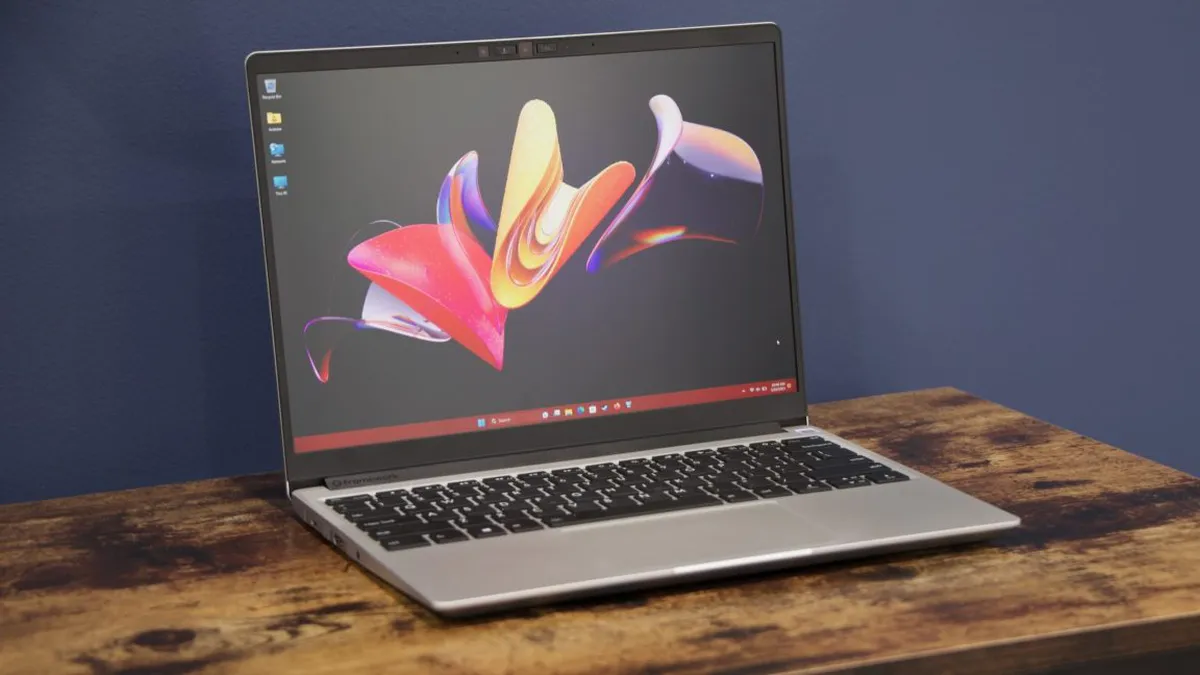
In a world where tech reliability is paramount, the Framework Laptop 13's recent BIOS update has sparked a crisis that has left many users frustrated and, in some cases, without functioning devices. Framework, known for its innovative modular laptops and commitment to sustainability, launched the Ryzen 7040-series Framework Laptop 13 in 2023, integrating cutting-edge technologies and user-friendly features. However, a BIOS update released in June 2026 has reportedly bricked numerous devices, raising serious questions about the update's stability and the company's support policies.
Reports from users flooded in shortly after the update, with many detailing experiences where their laptops became non-responsive, effectively turning them into expensive paperweights. As complaints surfaced, Framework's response has been both commendable and necessary to regain user trust.
Understanding the BIOS Update and Its Fallout
The BIOS (Basic Input/Output System) is a crucial piece of firmware that initializes hardware during the booting process and provides runtime services for operating systems and programs. In June 2026, Framework released BIOS version 3.20 for the Ryzen 7040-based Laptop 13, promising new features such as support for a haptic touchpad and improved audio systems. However, the update quickly became notorious for its failure to complete properly for many users, leading to devices that were unable to boot.
Users' Experiences
One user, identified as Sven, recounted their experience on the Framework forums, stating, "The update process seems to have stalled. I see a black screen and a progress bar with two dots, and then the Framework logo. The progress bar is not moving for about three hours now." This sentiment was echoed by numerous other users who reported similar issues, indicating a systemic problem rather than isolated incidents.
- Users reported: Devices becoming non-bootable after the BIOS update.
- Inability to reboot: Many were unable to turn off the device even after holding the power button for an extended period.
- Support responses: Some were told they required a new motherboard, but replacements were not offered for out-of-warranty devices.

Framework's Response: Support and Recovery Measures
In light of the mounting complaints, Framework's communication has been crucial. The company acknowledged that a small percentage of Framework Laptop 13 7040 Series BIOS updates had resulted in non-bootable boards. They are actively investigating the issue, which has been persistent since at least March 2025. To address customer concerns, Framework stated they would offer replacements for out-of-warranty mainboards in cases where a stable-release BIOS update caused the bricking.
Introducing Crisis Recovery Mode
Furthermore, Framework announced a new feature called “Crisis Recovery Mode,” aimed at providing a pathway for users with failed updates to recover their devices. This functionality is expected to roll out across various Framework Laptop models in upcoming BIOS releases. The introduction of such a recovery option is particularly significant, as it reflects the company's commitment to improving the user experience and mitigating the repercussions of this incident.
What Caused the Issues? Insights from Users and Experts
Speculation surrounding the cause of these BIOS issues has been rife, with some users suggesting that bugs in the update process led to inconsistent results. One blogger, Guanzhong Chen, shared insights into their experience, indicating that the BIOS update process displayed erratic behavior, showing what they described as "random memory on the screen." They suggested that the update's flashing speed was unusually slow, raising questions about the firmware's operational integrity.
These insights highlight an essential aspect of modern computing: the importance of thorough testing and quality assurance processes for software updates. As devices become increasingly complex, the potential for glitches or failures during critical updates escalates, underscoring the need for robust recovery options.
The Broader Implications for Users and the Industry
For consumers, the repercussions of this incident extend beyond a single product line. Users who rely on their laptops for work, education, or personal use are faced with significant disruptions. The financial implications can also be severe, especially if out-of-warranty replacements are required, potentially costing users hundreds of dollars.
From an industry perspective, this situation serves as a cautionary tale for hardware manufacturers. As the tech landscape evolves, the reliance on software updates to enhance functionality and fix bugs must be balanced with the need for reliability and user trust. Companies must prioritize extensive testing and clear communication to prevent similar issues in the future.

Key Takeaways
- Framework Laptop 13 users have reported widespread issues with BIOS update 3.20 bricking their devices.
- Framework is offering replacements for some out-of-warranty motherboards where a stable-release BIOS caused the issue.
- The company is introducing a Crisis Recovery Mode to help users recover from failed BIOS updates.
- Speculation about the cause of the issue includes bugs in the update process and slow flashing speeds.
- This incident highlights the critical need for robust testing and support mechanisms in technology updates.
Frequently Asked Questions
What exactly is a BIOS update, and why is it important?
A BIOS update is a software update for the Basic Input/Output System that enhances the functionality and performance of your computer's hardware. It is crucial because it can resolve bugs, enhance hardware compatibility, and introduce new features. However, if not executed correctly, it can lead to significant issues, such as rendering a device non-bootable.
How can I determine if my Framework Laptop is affected?
If you own a Framework Laptop 13 with a Ryzen 7040-series processor and have installed the BIOS version 3.20, you should monitor your device for any signs of failure, such as booting issues or unusual behavior during startup. Users are encouraged to check the Framework community forums for updates and shared experiences from other users.
What should I do if my laptop is bricked after the update?
If your laptop has become unresponsive after the BIOS update, the first step is to contact Framework's support team for assistance. They can provide guidance on recovery options and warranty policies. If your device is out of warranty, be sure to inquire about the possibility of a replacement motherboard if the failure can be traced back to the BIOS update.
What can I do to prevent similar issues in the future?
To minimize the risk of encountering similar problems in the future, always ensure that you have backups of your important data before performing any updates. Additionally, stay informed about updates through official channels and consider waiting for user feedback before installing major updates, especially those related to BIOS or firmware.
Comments
Google Pixel 11 Series Review: Is the Magic Fading?
The Google Pixel 11 series impresses with sleek design and robust software, but a lack of significant hardware innovation raises questions about its future appeal.
Related articles
Popular in Developer Tools
- Why Greylock Partners Caps Fund Size in a Growing Industry
- Roblox Unleashes AI-Powered Game Creation for Mobile Users
- DeepSeek Launches Open Source Alternative to Claude Code, Ups API Pricing
- Cursor Launches Origin: A New Challenger to GitHub's Dominance
- Apple's Camera-Equipped AirPods: Innovation or Invasion?