WhatsApp Enhances Web Calling Features: A Game Changer for Users
WhatsApp has introduced a suite of new calling features for its web app, allowing users to make and receive audio and video calls seamlessly. This update not only brings convenience but also several advanced functionalities that enhance the calling experience.
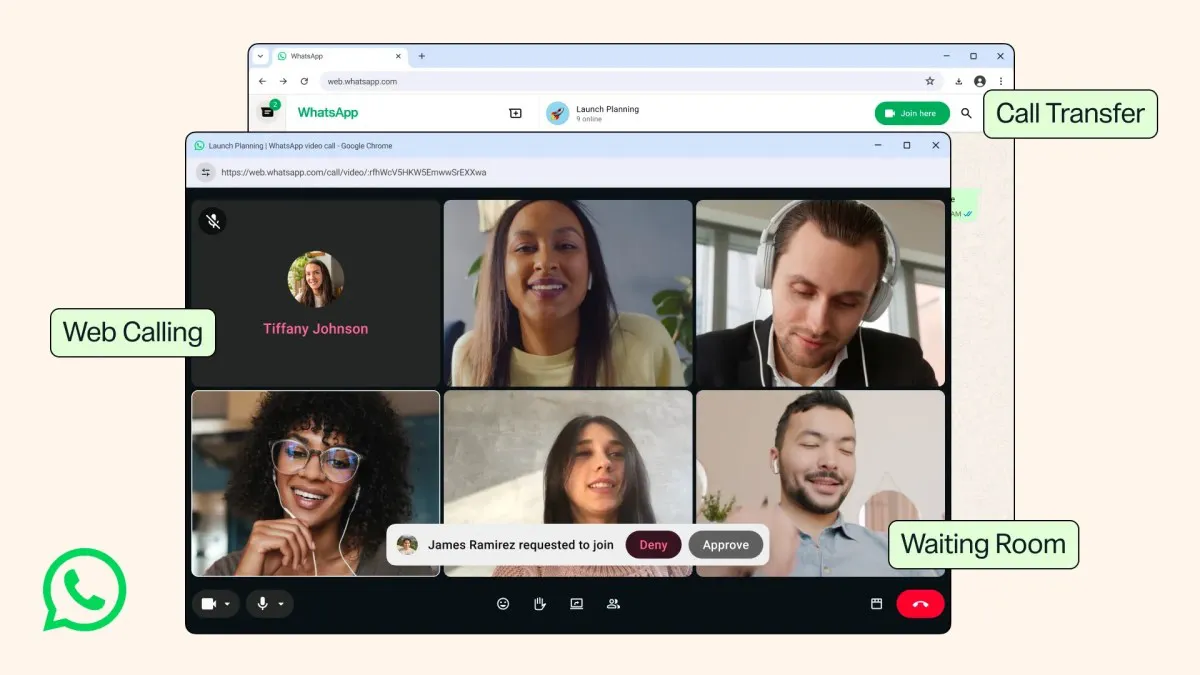
In a significant move that could redefine how users engage with the platform, WhatsApp has officially rolled out its calling feature for the web app. For years, the ability to make and receive calls was limited to the smartphone and desktop applications, which has left many users craving more flexibility. With this latest update, Meta, the parent company of WhatsApp, is not only enhancing user experience but also positioning the platform as a more viable option for both personal and professional communication.
The introduction of calling capabilities on WhatsApp Web means that users can now engage in audio and video calls directly from their browsers. This shift is particularly timely as the demand for virtual communication tools continues to rise, especially in a post-pandemic world where remote work and online meetings have become the norm. The new features are expected to appeal to a wide range of users, from casual chatters to business professionals looking for efficient communication solutions.

Expanded Calling Features on WhatsApp Web
The upgraded WhatsApp Web now boasts a dedicated Calls tab that stores your call history and favorites, mirroring the structure already familiar to mobile and desktop app users. This means that transitioning between devices will be seamless, allowing users to keep track of their communication regardless of whether they're using their phone or a computer.
Key Features of WhatsApp Web Calls
- Call Transfer: Users can now transfer calls between devices without disconnecting, allowing for a fluid transition from web to mobile or vice versa.
- Waiting Rooms: For group calls, hosts can create waiting rooms, granting them control over who joins the conversation in real time.
- Background Noise Suppression: This feature filters out distracting background noise, making calls clearer, especially in bustling environments.
- High-Definition Video Calls: WhatsApp will stream video calls in high definition right from the start, eliminating delays that have previously marred user experiences.
These enhancements not only make WhatsApp more competitive against other leading communication platforms but also signify Meta's commitment to continually improving user experience across its products.

Why These Features Matter
The new calling capabilities on WhatsApp Web are especially relevant in today's digital landscape, where communication tools are essential for both personal connections and business operations. The ability to initiate and manage calls directly from a web browser opens doors for remote workers who rely heavily on digital communication platforms. The waiting room feature, in particular, is a game changer for professionals hosting meetings, providing a layer of control that can enhance productivity and organization.
Enhancing Professional Communication
For businesses that depend on effective communication tools, the ability to manage calls through WhatsApp Web can streamline workflows. By integrating WhatsApp calls into their standard operating procedures, teams can leverage existing contacts without needing to switch platforms. This integration reduces friction and enhances collaboration, particularly for teams distributed across different geographical locations.

Implications for User Privacy and Security
With the increase in calling features on WhatsApp Web, it’s crucial to consider the implications for user privacy and data security. WhatsApp has built its reputation on end-to-end encryption, a feature that ensures only the communicating users can read the messages or hear the calls. However, with new features, users must remain vigilant about their privacy settings. As the platform evolves, it’s essential for users to stay informed about their settings and the data they share, especially in professional settings.
Best Practices for Secure Use
To maximize the benefits of these new features while maintaining security, users should:
- Regularly update the app to ensure they have the latest security features.
- Use strong, unique passwords for their accounts and enable two-factor authentication.
- Be cautious about sharing links to group calls and consider using the waiting room feature to vet participants.
Future Updates and Username Feature
In addition to the new calling features, WhatsApp recently announced the opening of reservations for usernames. Once implemented, this feature will enable users to call others across platforms using unique usernames instead of phone numbers. This could further enhance user privacy and simplify the process of connecting with others, especially for those who may be hesitant to share their phone numbers.
What to Expect Next
As WhatsApp continues to roll out these updates, users can expect even more innovations aimed at improving the overall communication experience. The company is likely to focus on enhancing user interface elements, expanding group call capabilities, and integrating even more features that cater to the needs of both casual and professional users.

Key Takeaways
- WhatsApp Web now supports audio and video calls, enhancing usability.
- New features like call transfer and waiting rooms enhance meeting control.
- Background noise suppression improves call clarity in noisy environments.
- High-definition video streaming begins immediately, enhancing user experience.
- Upcoming username feature could simplify cross-platform communication.
Frequently Asked Questions
What devices can I use to make calls on WhatsApp Web?
You can make calls on WhatsApp Web using any device that supports a web browser. This includes desktops, laptops, and tablets. However, for the best experience, it is recommended to use a stable internet connection and a device with a good microphone and camera, especially for video calls.
How does the waiting room feature work?
The waiting room feature allows hosts to manage who joins a group call. When creating a call link, you can enable the option for requiring approval to join. Participants will wait in a virtual room until you decide to let them in or remove them, allowing for more control over your meetings.
Is my privacy protected during WhatsApp Web calls?
Yes, WhatsApp calls are protected by end-to-end encryption, meaning that only the participants in the call can access the audio and video. It is still important to be cautious about sharing links or meeting details to ensure that only intended recipients join your calls.
Will I be able to call users on other platforms with the new username feature?
Once the username feature is fully launched, users will be able to call others across platforms using their unique usernames. This is intended to streamline communication and enhance privacy, as users will not need to share their phone numbers to connect with others.
Comments
Elon Musk's X Money App Launches in the US: What You Need to Know
Elon Musk's X Money app has officially launched for U.S. users, offering a new way to manage finances through a Visa debit card and attractive rewards. This development marks a significant step in Musk's vision for an 'everything app.'

Related articles




Popular in SaaS Reviews
- Roost: The 'Slow-cial' App Redefining Digital Communication
- Uber's Expansion Beyond Ride-Hailing: The Future of Travel and Services
- Sweden's Startup Surge: The Forces Behind a Booming Ecosystem
- X's Algorithm Update: Creating a More Community-Focused Experience
- Elon Musk's Vision for X: Real-Time Misinformation Corrections via DMs