Adobe's Project Indigo: Revolutionizing Photography with AI Insights
Adobe's Project Indigo introduces AI-powered photography critiques and editing suggestions, enhancing the creative process for both amateurs and professionals. This innovative app aims to teach users about photography while simplifying complex editing tasks through advanced AI tools.
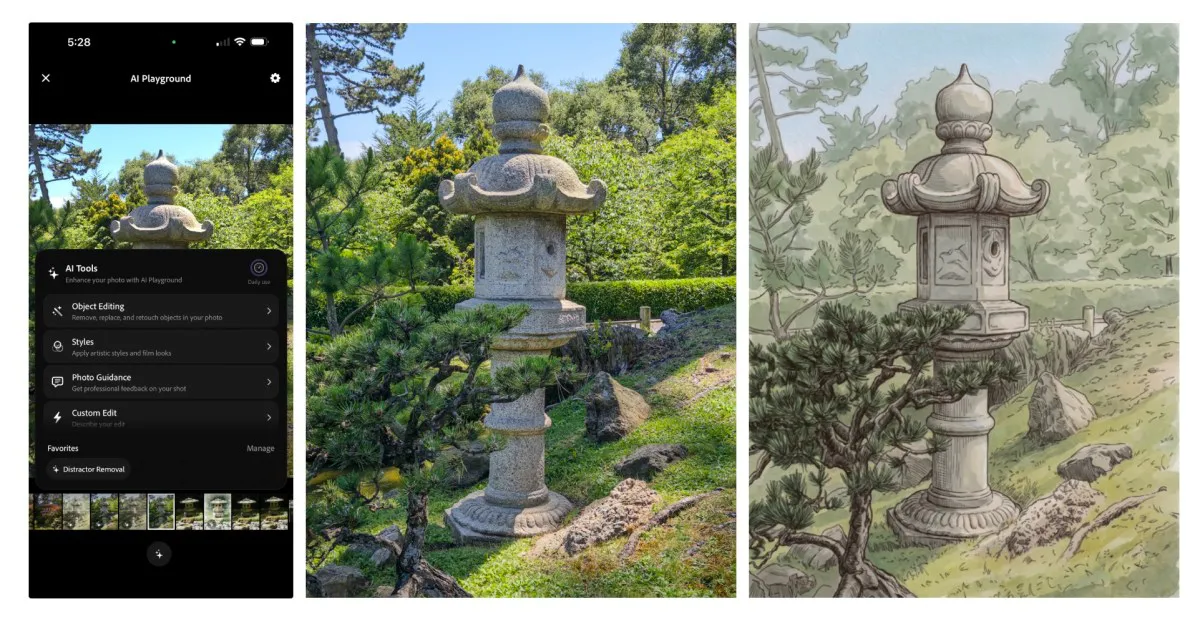
In an age where smartphones dominate photography, Adobe's Project Indigo is stepping up the game by integrating artificial intelligence into its iOS camera app. Launched as an experimental platform, Project Indigo aims to empower users with advanced features that not only enhance their photography skills but also provide intelligent feedback on their captures. From professional critiques to sophisticated editing tools, this app is designed to guide both budding photographers and seasoned professionals in their creative journeys.
With the rise of AI technologies, particularly those using large language models (LLMs), Adobe is making significant strides in how we approach photography. By using AI to critique photos and suggest edits, the app offers a fresh perspective on the art of photography, helping users to better understand the nuances of framing, lighting, and composition. This feature could potentially change the way users interact with photography apps, moving beyond basic editing to a more educational experience.

AI-Powered Photo Critiques: A New Learning Tool
One of the standout features of Project Indigo is its ability to critique images using AI. This function provides users with a “professional” opinion on various aspects of their photos, including:
- Framing: Suggestions on how to better compose the shot.
- Lighting: Insights on exposure and how to adjust for optimal brightness.
- Color Balance: Analysis of color harmony and suggestions for improvement.
- Emotional Impact: Evaluating how effectively the image conveys a message or feeling.
These critiques are designed not just to point out flaws but to educate users on why certain elements work or don’t work in photography. For example, a user might upload a picture and receive a recommendation to adjust the angle for improved composition or to change the exposure settings to enhance colors.

Intuitive Capture and Edit Suggestions
Beyond critiquing existing photos, Project Indigo offers capture and edit suggestions that can help users take better shots in real-time. This functionality works by analyzing the scene in view and providing actionable advice. For instance, if a user is about to take a picture with distracting elements in the background, the app might suggest removing those objects before capturing the image.
Additionally, the app includes an advanced editing suite, leveraging Adobe Lightroom controls to improve existing images. This integration allows users to apply professional-level edits without needing extensive knowledge about the software. The aim is to simplify the editing process and make high-quality photography accessible to everyone.

Advanced Object Removal and Depth of Field
One of the most exciting developments in Project Indigo is its advanced object removal feature. Traditional photography apps often require users to manually select objects to be removed, a process that can be tedious and imprecise. In contrast, Project Indigo allows for intuitive toggles that let users specify what to remove from their photos. This includes items like:
- Background people
- Unwanted trash or clutter
- Wires and poles
- Vehicles and other obstructions
The AI excels at seamlessly removing these elements without leaving behind any artifacts, making it a powerful tool for enhancing the overall quality of a photograph. This level of sophistication can save users a considerable amount of time and effort in post-production.
Exploring Style Transfer Features
Another intriguing aspect of Project Indigo is its foray into style transfer, allowing users to apply artistic effects to their photos. Drawing on techniques reminiscent of the early Prisma app, users can transform their images into various artistic styles, including:
- Watercolor
- Pen and ink
- Monochromatic
While style transfer is not entirely new in the realm of photography, the refinement of these outputs in Project Indigo sets it apart from previous iterations. Users can experiment with these features to add a unique flair to their images, further enhancing their creative expression.

Future Possibilities and Challenges
Despite the promising advancements in Project Indigo, it is essential to recognize that these features are currently in testing phases and are available to select users. Adobe is utilizing Google’s Gemini-based Nano Banana for these features while being open to incorporating its own Adobe Firefly model in the future. The core goal of Project Indigo is to create a platform that educates users about photography, rather than simply generating visually appealing images.
However, there are challenges ahead. The reliance on AI for suggestions may lead to a homogenization of creativity if users become overly dependent on the app's guidance. Striking a balance between leveraging AI for assistance and maintaining personal artistic expression will be crucial as these technologies evolve.
Key Takeaways
- Adobe's Project Indigo integrates AI for photo critiques and editing suggestions.
- The app's features promote learning and improvement in photography skills.
- Advanced object removal and style transfer enhance the editing experience.
- Currently in testing, features may evolve based on user feedback and technology advancements.
Frequently Asked Questions
What is Adobe's Project Indigo?
Project Indigo is an experimental photography app developed by Adobe that utilizes AI to provide critiques and editing suggestions for photos. Launched in 2025, it aims to enhance users' photography skills while making complex editing tasks more accessible.
How does the AI critique feature work?
The AI critique feature analyzes uploaded photos and provides feedback on aspects such as framing, lighting, color, and emotional impact. This feedback is designed to educate users and help them understand the nuances of effective photography.
Can I use Project Indigo for real-time photo suggestions?
Yes, Project Indigo offers real-time capture and edit suggestions that assist users in taking better photos by analyzing the scene and providing actionable advice before the shot is taken.
Is the app available to everyone?
Currently, Project Indigo is in a testing phase, and its advanced features are accessible to select users only. However, Adobe may expand access based on user feedback and the successful integration of technology.
Comments
X Relaunches Android App: A New Era for Social Networking
After a year-long development effort, X has launched a completely rebuilt Android app, promising enhanced performance and user experience. This significant upgrade aims to attract more users in a market dominated by Android devices.

Related articles
Popular in Developer Tools
- Why Greylock Partners Caps Fund Size in a Growing Industry
- Roblox Unleashes AI-Powered Game Creation for Mobile Users
- DeepSeek Launches Open Source Alternative to Claude Code, Ups API Pricing
- Cursor Launches Origin: A New Challenger to GitHub's Dominance
- Apple's Camera-Equipped AirPods: Innovation or Invasion?