Exploring the Wacom MovinkPad 11: A Gateway for Digital Artists
The Wacom MovinkPad 11 offers a solid entry point for aspiring digital artists. With its user-friendly design and competitive pricing, it is an attractive option for those venturing into the digital art realm.
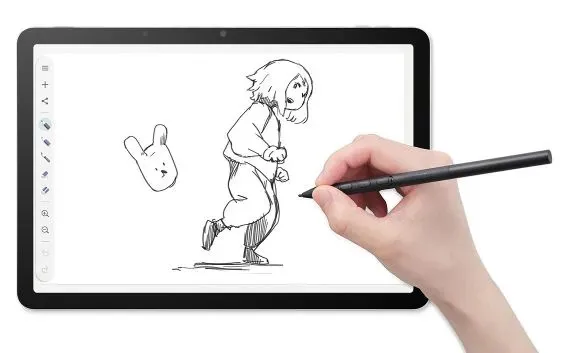
In the realm of digital art, the tools an artist uses can significantly influence their creative output. For years, Wacom has stood at the forefront of this market, providing artists with innovative solutions that bridge the gap between traditional and digital mediums. The Wacom MovinkPad 11, an Android-based tablet, has emerged as a mid-priced entry point for budding digital artists, offering a balance of affordability and functionality. As someone who isn’t a professional artist but has a keen interest in technology, I seized the opportunity to explore what this device has to offer.
The MovinkPad 11, launched as part of Wacom’s MovinkPad series, is designed to cater to a diverse audience that ranges from casual doodlers to serious digital creators. Priced at $500, it positions itself between more budget-friendly options, like the Huion Inspiroy H640P at around $30, and premium devices like Wacom's own Cintiq Pro 27, which can cost upwards of $3,500. This article delves deeper into the MovinkPad 11, assessing its features, usability, and ideal user base while considering the broader context of digital art tools.
The Rise of Digital Art
Digital art has gained immense popularity over the past two decades, fueled by advancements in technology and the proliferation of social media platforms where artists can showcase their work. The digital art community comprises graphic designers, animators, and even traditional artists who embrace digital tools for sketching and conceptualization. Unlike traditional art forms, digital art offers unique capabilities, such as easy editing, the ability to work with layers, and a vast array of brushes and effects that can be applied with just a few clicks.
Wacom, founded in 1983, has been instrumental in shaping this landscape. The company’s graphics tablets have become synonymous with high-quality digital art creation, and the MovinkPad series aims to democratize access to these tools. The MovinkPad 11 serves as an entry point for artists looking to transition into the digital realm without breaking the bank.
Key Features of the MovinkPad 11
The Wacom MovinkPad 11 is equipped with features that make it an attractive choice for artists at various skill levels. Here’s a closer look at what this device has to offer:
- Display Size: The tablet features an 11.45-inch screen that strikes a balance between portability and usability.
- Memory and Storage: With 8 GB of RAM and 128 GB of storage, it provides adequate space for storing projects and applications.
- Stylus: The included Pro Pen 3 stylus offers a comfortable grip and customizable nib options for diverse drawing styles.
- Battery-Free Operation: The device uses a USB charger, eliminating the need for batteries and making it convenient for on-the-go use.
- Software Support: It comes with Wacom Canvas, a free application for sketching, and supports popular programs like Clip Studio Paint for advanced features.

Usability and Setup
For those new to digital art, the MovinkPad 11 is designed to be user-friendly. Setting up the tablet is straightforward, requiring users to create a PIN for security purposes. While some may question the necessity of this feature for casual sketches, it can provide peace of mind for those concerned about their digital creations.
Once set up, the tablet syncs seamlessly with Google accounts, allowing users to easily access their creative materials. The Wacom Canvas software offers basic tools that are suitable for beginners, while Clip Studio Paint caters to more experienced users with its comprehensive features. Moreover, the ability to customize the stylus and its settings enhances the overall user experience.
Competitive Landscape
In a crowded market, the MovinkPad 11 faces competition from various other devices, notably the iPad and its accompanying Apple Pencil. While the iPad boasts a wide range of art applications, the MovinkPad series distinguishes itself with its dedicated focus on digital art creation.
Furthermore, Wacom's longstanding reputation in the graphics tablet industry lends credibility to the MovinkPad 11. For artists who prioritize specialized tools designed specifically for their craft, the MovinkPad offers a compelling alternative to multi-purpose tablets like the iPad.
Final Thoughts: Who Should Consider the MovinkPad 11?
The Wacom MovinkPad 11 is an excellent choice for aspiring digital artists, hobbyists, and anyone looking to explore the world of digital creativity without a significant financial investment. It provides a solid balance of features and usability, making it accessible for those who may be intimidated by more advanced devices.
While it may be priced a bit high for casual users who do not have a specific interest in digital art, for those with a passion for sketching or digital doodling, the MovinkPad 11 presents a fun and engaging platform to bring artistic visions to life. My personal experience with the device confirmed its potential to inspire creativity, even for someone who does not consider themselves an artist.
Key Takeaways
- The Wacom MovinkPad 11 is a mid-priced tablet, ideal for budding digital artists.
- It features an 11.45-inch display, 8 GB of RAM, and 128 GB of storage.
- The Pro Pen 3 stylus offers customizable nib options and a comfortable grip.
- Wacom Canvas provides a basic software option, while Clip Studio Paint caters to advanced users.
- It stands out in a competitive market for its focus on digital art tools.
Frequently Asked Questions
What types of users would benefit from the MovinkPad 11?
The MovinkPad 11 is designed for a wide range of users, particularly those who are new to digital art, hobbyists, and aspiring creators. Its user-friendly interface and affordable price point make it accessible for individuals who may not want to invest heavily in more advanced equipment. Additionally, traditional artists looking to explore digital mediums can also find value in the MovinkPad as a tool for sketching and conceptualization.
How does the MovinkPad 11 compare to more expensive models?
While the MovinkPad 11 offers a solid entry point for digital artists, more expensive models, such as the MovinkPad Pro 14, provide advanced features such as higher resolution displays, improved color accuracy, and additional performance capabilities. The Pro version is better suited for professionals who require high-end specifications for their work, while the MovinkPad 11 remains a great option for casual users and beginners.
Is the MovinkPad 11 compatible with other software?
Yes, the MovinkPad 11 is compatible with various digital art software applications, including Wacom's own Wacom Canvas and third-party programs like Clip Studio Paint. Users can take advantage of these software options to enhance their creative process, with Clip Studio Paint offering a more extensive range of features for advanced art creation. This flexibility allows artists to choose the tools that best suit their needs.
What are the advantages of using a digital tablet like the MovinkPad 11?
Using a digital tablet like the MovinkPad 11 has several advantages over traditional drawing methods. Digital art allows for easy manipulation of artwork, including layering, undoing mistakes, and applying a wide variety of brushes and effects. Additionally, artists can save their work digitally, reducing the need for physical storage. Moreover, the ability to share creations easily on social media platforms enhances visibility and engagement with audiences, making digital art a dynamic and evolving medium.
Comments
Popular in Developer Tools
- Why Greylock Partners Caps Fund Size in a Growing Industry
- Roblox Unleashes AI-Powered Game Creation for Mobile Users
- DeepSeek Launches Open Source Alternative to Claude Code, Ups API Pricing
- Cursor Launches Origin: A New Challenger to GitHub's Dominance
- Apple's Camera-Equipped AirPods: Innovation or Invasion?